Building A GitHub Triage Tracker with the Claude API
I built two VS Code extensions with the Claude API, just so I could get a better handle on Claude. But I also used the API to build a GitHub Triage Tracker.
This Tracker isn't an Earth-shattering app, but building it increased my Claude knowledge. Here's the write-up...
Table of Contents
- How Claude Works With the Triage Tracker
- A Quick Chat About Zod
- Code Architecture
- Triage Tracker -
validate.ts - Triage Tracker -
fetch.ts - Triage Tracker -
enrich.ts - Triage Tracker -
write.ts - Triage Tracker -
index.ts - Conclusion
How Claude Works With the Triage Tracker
For the Triage Tracker, the Claude API works pretty much the same way it did with the VS Code extensions. A reminder of how it works:
- Claude is stateless. If you're "having a conversation with it" through prompts, it doesn't remember your past prompts. Instead, your code re-sends the full conversation history with each new request, and Claude uses that as context.
- Claude is powerful prediction software. It's really REALLY good at "guessing" how to respond to prompts.
- Calling the Claude API requires an API key. Get a Claude API key and place it in an
.envfile at the root (Claude account required). It should look like this:ANTHROPIC_API_KEY=XX-XXXX-XXXXXX
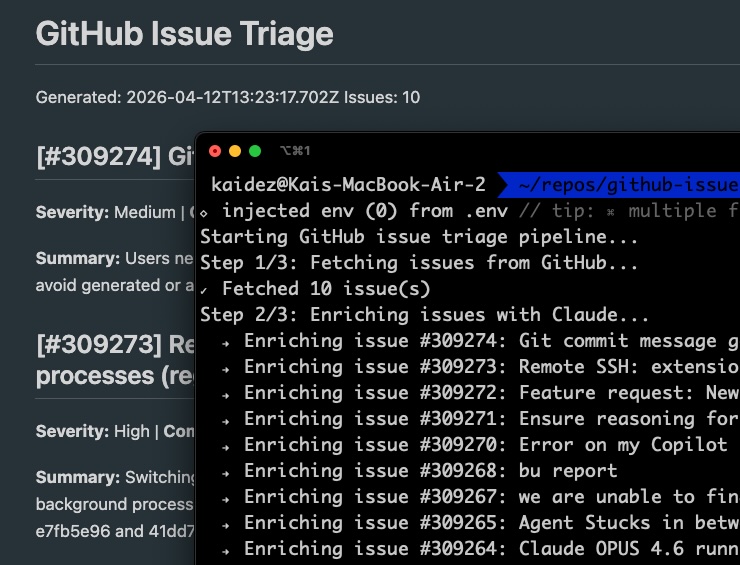
The tracker sends a request to GitHub's API and pulls open issues from VS Code's public repo. Claude's API then analyzes those issues, using its powerful "guessing" ability to determine how severe they are.
The issue data is saved to a JSON file, which is then output to the command line. Separately, it's saved to a local Markdown file.
A Quick Chat About Zod
The Triage Tracker is written in TypeScript (TS) and because of how it interprets Claude's data output, Zod is needed. And if we're talking about TS development, Zod is worth a discussion.
Zod is a validation library: you declare the shape you expect your data to have. Zod then checks that incoming data actually matches that shape at runtime.
Validating data in forms is a common use case for web apps, and Zod can help with that, too. But this tracker needs to validate the incoming VS Code issues data described above.
I declare the expected shape of each issue in advance with TypeScript. But there's no guarantee that the types I pull from GitHub will match up with what Claude sends back. That's where errors show up.
Zod validates that Claude's response actually matches that declared shape before the data is saved. We'll see this in action when we look at validate.ts.
Like jQuery became a de facto standard in frontend development, Zod is now a go-to tool in TypeScript development.
Code Architecture
The tracker is coded up using a standard ETL pattern, split across five modular files, each with its own responsibility:
validate.tsfetch.tsenrich.tswrite.tsindex.ts
validate.ts manages the aforementioned data typing. index.ts is the entry point that runs the other TypeScript modules sequentially.
Triage Tracker - validate.ts
Based on the Zod description above, validate.ts is essentially a helper file.
import { z } from 'zod';

export const EnrichedIssueSchema = z.object({
  number: z.number(),
  title: z.string(),
  body: z.string().nullable(),
  labels: z.array(z.string()),
  created_at: z.string(),
  comments: z.number(),
  severity: z.enum(['Critical', 'High', 'Medium', 'Low']),
  summary: z.string(),
  next_action: z.string(),
});

export type EnrichedIssue = z.infer<typeof EnrichedIssueSchema>;
Zod is imported and used to define EnrichedIssueSchema, where each field has a Zod validator enforcing its type. EnrichedIssueSchema gets a TypeScript type called EnrichedIssue via z.infer, giving you static type safety without writing the type manually.
Triage Tracker - fetch.ts
import dotenv from 'dotenv';
dotenv.config();

const GITHUB_API_URL = 'https://api.github.com/repos/microsoft/vscode/issues';

export interface GitHubIssue {
  number: number;
  title: string;
  body: string | null;
  labels: { name: string }[];
  created_at: string;
  comments: number;
}

export async function fetchIssues(limit = 10): Promise<GitHubIssue[]> {
  const response = await fetch(`${GITHUB_API_URL}?state=open&per_page=${limit}`);

  if (!response.ok) {
    throw new Error(`GitHub API error: ${response.status} ${response.statusText}`);
  }

  const issues = await response.json() as GitHubIssue[];
  return issues;
}
This is where the Tracker makes an API request for the VS Code issues posted on GitHub. It calls dotenv.config() to load the Anthropic API key, then makes a GET request to the GitHub API.
A TypeScript interface named GitHubIssue is created. It contains the field names listed in the returned GitHub data.
The fetchIssues() function does a standard request/response action for the GitHub data. It takes a single parameter of limit, defining how many total issues to return. By default, it requests 10 issues at most.
Finally, the data is loaded as a JSON array in const issues.
Triage Tracker - enrich.ts
import { Anthropic } from '@anthropic-ai/sdk';
import { EnrichedIssueSchema, EnrichedIssue } from './validate.js';
import { GitHubIssue } from './fetch.js';

const client = new Anthropic({
  apiKey: process.env.ANTHROPIC_API_KEY,
});

const SYSTEM_PROMPT = `You are an engineering triage assistant. Analyze GitHub issues and return structured JSON only. No explanation, no markdown, no code fences. Return only valid JSON.`;

function buildUserPrompt(issue: GitHubIssue): string {
  const labels = issue.labels.map(l => l.name).join(', ') || 'none';
  const body = issue.body?.trim() || 'No description provided.';

  return `Analyze this GitHub issue and return a JSON object with exactly these three fields:

  - "severity": one of "Critical", "High", "Medium", or "Low"
  - "summary": one sentence describing the problem in plain English
  - "next_action": a short suggested action (e.g. "Needs reproduction steps", "Ready to assign", "Duplicate — close", "Needs more info")

  Issue #${issue.number}
  Title: ${issue.title}
  Labels: ${labels}
  Comments: ${issue.comments}
  Body: ${body}

  Return only the JSON object. No other text.`;
}

export async function enrichIssue(
  issue: GitHubIssue,
  anthropicClient: Anthropic = client
): Promise<EnrichedIssue> {

    const message = await anthropicClient.messages.create({
      model: 'claude-haiku-4-5-20251001',
      max_tokens: 256,
      system: SYSTEM_PROMPT,
      messages: [{ role: 'user', content: buildUserPrompt(issue) }],
    });

    const raw = message.content[0].type === 'text'
      ? message.content[0].text.replace(/^`json\s*/i, '').replace(/`\s\*$/, '').trim()
    : '';

    let parsed: unknown;
      try {
        parsed = JSON.parse(raw);
      } catch {
        throw new Error(`Claude returned non-JSON for issue #${issue.number}: ${raw}`);
      }

    const result = EnrichedIssueSchema.safeParse({
      number: issue.number,
      title: issue.title,
      body: issue.body,
      labels: issue.labels.map(l => l.name),
      created_at: issue.created_at,
      comments: issue.comments,
      ...(parsed as object),
    });

    if (!result.success) {
      throw new Error(`Zod validation failed for issue #${issue.number}: ${result.error.message}`);
    }

    return result.data;
}
enrich.ts is where the Tracker puts Zod's data validation power to work. It's also where the data that was pulled from GitHub gets sent out to Claude in the form of prompts.
Claude analyzes each issue, categorizes it by severity, and returns a response. Zod then validates that response against the declared schema before saving.
First, two consts are created:
const clientstores the Anthropic API key that was configured earlier.const SYSTEM_PROMPTcreates the initial prompt we send to Claude when we send it the GitHub data. Note the prompt follows a Claude best practice by assigning Claude a role..."engineering triage assistant" in this case.
Next, two functions handle prompt construction and the Claude API call. buildUserPrompt() takes an issue parameter typed as GitHubIssue from fetch.ts and formats it into a prompt string for Claude.
enrichIssue() sends the prompt to Claude and stores the response in const message. We'll see the actual loop over all the issues later on in index.ts, which calls enrichIssue() once per issue.
const raw and let parsed have respective roles in formatting the data and JSON. const result is where Zod validates the issue data.
Triage Tracker - write.ts
import { promises as fs } from 'fs';
import path from 'path';
import { EnrichedIssue } from './validate.js';

const OUTPUT_DIR = 'output';
const OUTPUT_FILE = 'enriched-issues.json';

interface PipelineOutput {
  generated_at: string;
  issue_count: number;
  issues: EnrichedIssue[];
}

export async function writeOutput(issues: EnrichedIssue[]): Promise<void> {
  await fs.mkdir(OUTPUT_DIR, { recursive: true });
  await Promise.all([
    fs.rm(path.join(OUTPUT_DIR, OUTPUT_FILE), { force: true }),
    fs.rm(path.join(OUTPUT_DIR, 'report.md'), { force: true }),
  ]);

  const output: PipelineOutput = {
    generated_at: new Date().toISOString(),
    issue_count: issues.length,
    issues: issues
  };

  const filePath = path.join(OUTPUT_DIR, OUTPUT_FILE);
  await fs.writeFile(filePath, JSON.stringify(output, null, 2), 'utf8');

  console.log(`✓ Wrote ${issues.length} enriched issue(s) to ${filePath}`);
}

export async function writeToFile(issues: EnrichedIssue[]): Promise<void> {

  const json = JSON.parse(await fs.readFile('output/enriched-issues.json', 'utf8'));
  const report = path.join(OUTPUT_DIR, 'report.md');

  const lines = [
    `# GitHub Issue Triage`,
    `Generated: ${json.generated_at}`,
    `Issues: ${json.issue_count}`,
    '',
  ];

  for (const issue of json.issues) {
    lines.push(`## [#${issue.number}] ${issue.title}`);
    lines.push(`**Severity:** ${issue.severity} | **Comments:** ${issue.comments}`);
    lines.push('');
    lines.push(`**Summary:** ${issue.summary}`);
    lines.push(`**Next action:** ${issue.next_action}`);
    lines.push('');
  }

  await fs.writeFile(report, lines.join('\n'), 'utf8');
  console.log(`✓ Wrote report to ${report}`);

}
This is the file that generates a JSON file with the triaged issues data. It also pulls the data from that file and loads it into a readable Markdown file.
const OUTPUT_DIR is the folder where both of these files will live. If it doesn't exist, it's created at runtime.
const OUTPUT_FILE is the JSON file that's created. Every new time that the Tracker runs, it's deleted and a fresh, new file is created.
A PipelineOutput interface defines three top-level fields in the JSON: generated_at, issue_count, and issues. That's validated using the Zod-powered EnrichedIssue schema we created in validate.ts.
writeOutput() takes our issues as a parameter typed against EnrichedIssue[], and is what's used to create the JSON file. First, it deletes any existing versions of the JSON and Markdown files using Node's fs.rm() method.
Next, const filePath builds the data's file path using Node's path.join() method...the path being output/enriched-issues.json. Then Node's fs.writeFile() method actually writes the data to that file. View a sample JSON file.
When all this is done, a success message is logged out to the console.
writeToFile() is used to build the Markdown file and also takes issues as a parameter. This function's built similar to writeOutput() in terms of consts storing file paths and data, and console outputs.
But this time, const lines stores the Markdown header. It then loops over the JSON data and writes the full array to the file. View a sample Markdown report.
Triage Tracker - index.ts
import 'dotenv/config';
import { fetchIssues } from './fetch.js';
import { enrichIssue } from './enrich.js';
import { writeOutput, writeToFile } from './write.js';

// Import the TypeScript type inferred from the Zod schema — used to type the enriched issues array.
import { EnrichedIssue } from './validate.js';

async function run(): Promise {
  console.log('Starting GitHub issue triage pipeline...');

  console.log('Step 1/3: Fetching issues from GitHub...');
  const issues = await fetchIssues(5);
  console.log(`✓ Fetched ${issues.length} issue(s)`);

  console.log('Step 2/3: Enriching issues with Claude...');
  const enriched: EnrichedIssue[] = [];

  for (const issue of issues) {
    console.log(`  → Enriching issue #${issue.number}: ${issue.title}`);
    const result = await enrichIssue(issue);
    enriched.push(result);
  }
  console.log(`✓ Enriched ${enriched.length} issue(s)`);

  console.log('Step 3/3: Writing output...');
  await writeOutput(enriched);
  await writeToFile(enriched);

  console.log('\nPipeline complete.');
}

run().catch((error) => {
  console.error('Pipeline failed:', error);
  process.exit(1);
});
index.ts runs all of this together in the following sequence:
fetch.tsuses its internalfetchIssues()method to grab the VS Code issue data from GitHub. `const issues` is where you can figure if you want to pull less than 10 issues...this demo pulls five.enrich.tsuses its internalenrichIssue()method to validate the data and load it into dynamically-created prompts to send to Claude's API.write.tssaves triaged issues as JSON viawriteOutput()and generates a Markdown report via `writeToFile()`.
Conclusion
Claude certainly wrote some of this code, but not all of it. What Claude worked overtime doing was using its API to apply strong deductive reasoning to the data I gave it.
I'm starting to realize that this reasoning power is really understated when describing Claude, or any LLM for that matter. People who realize it does more than generate code will have a real edge in the workplace.
Digging deep into Zod was also helpful. That second layer of validation caught type mismatches before any bad data could be saved.
The real triage outcome here wasn't a cleaner issue list...it was a clearer picture of what these tools are actually capable of. Now if only there were a Zod schema for validating my own project ideas before I start building them.